Da, poți beneficia de o conexiune Wi-Fi funcțională pe un iaht închiriat, dar configurația care funcționează cu adevărat pentru majoritatea chiriașilor este una hibridă: o cartelă SIM locală sau un router 4G/5G ca bază, iar Starlink este utilizat doar atunci când îl soliciți în mod expres sau ai nevoie de acoperire în larg. Înainte de a face rezervarea, verificați trei aspecte: dacă Starlink este instalat și inclus în preț, care sunt limitele de date și dacă iahtul dispune de capacitatea energetică necesară pentru a-l alimenta în timp ce staționează la ancoră.
Cine are de fapt nevoie de Starlink? Dacă călătoria ta presupune deplasări de-a lungul coastei, între insule și porturi de agrement, un router marin performant, cu cartele SIM locale, îți va asigura probabil acoperirea necesară. Dacă însă plănuiești să petreci perioade îndelungate la ancoră, departe de țărm, să efectuezi apeluri video pentru serviciu sau să navighezi pe rute cu acoperire celulară instabilă, serviciul prin satelit merită costul suplimentar.
- Întrebați dacă serviciile Starlink sau datele cu prioritate maritimă sunt incluse în pachetul standard sau sunt disponibile ca opțiune suplimentară contra cost
- Asigură-te că primești în scris limita reală de date, nu doar mențiunea “nelimitat” din broșură
- Asigurați-vă că bateria și invertorul iahtului pot susține funcționarea unui terminal satelit timp de câteva ore
Principalele concluzii
O conexiune Wi-Fi fiabilă pe un iaht închiriat se obține prin combinarea unei cartele SIM locale sau a unui router 4G/5G ca infrastructură de bază cu serviciul Starlink, rezervat pentru situații în larg sau pentru cerințe ridicate, și nu prin utilizarea unei singure tehnologii.
| Punct | Detalii |
|---|---|
| Configurația hibridă câștigă | Folosiți un router local cu SIM/eSIM pentru acoperire de-a lungul coastei împreună cu Starlink doar atunci când acoperirea în larg sau apelurile video intense o impun. |
| Acoperirea rețelei mobile are limite | Vă puteți aștepta la o conexiune 4G/5G stabilă la o distanță de aproximativ 20–25 de mile marine de țărm, cu ajutorul unui router marin și al unei antene externe. |
| Puterea este cel mai important factor | Verificați capacitatea bateriei, a invertorului și a sistemului solar înainte de a presupune că Starlink poate funcționa toată ziua când nava este ancorată. |
| Wi-Fi-ul din portul de agrement este doar o soluție de rezervă | Folosiți rețelele din port pentru descărcări sau actualizări de dimensiuni mari, dar niciodată ca conexiune principală pe mare. |
| Întreabă înainte de a face rezervarea | Sailarmada vă confirmă tipul routerului, includerea serviciului Starlink și configurația de alimentare în timpul convorbirii de rezervare. |
Cuprins
- Wi-Fi prin satelit, rețea mobilă și în porturi: cum funcționează de fapt fiecare dintre acestea
- Cât costă, de fapt, conexiunea Wi-Fi pe un iaht închiriat?
- Ce ar trebui să-l întrebi pe agentul tău imobiliar înainte de a face rezervarea?
- Cum poți obține cea mai bună conexiune odată ce te-ai urcat la bord?
- De ce experiența SailArmada în domeniul închirierii de ambarcațiuni stă la baza acestui sfat
- Cum poți să te asiguri că toată lumea rămâne conectată la internet fără ca rețeaua Wi-Fi să funcționeze lent?
- Dispozitivele tale vor funcționa cu adevărat cu rețeaua iahtului?
- Cum se poate îmbunătăți intensitatea semnalului sub punte?
- Ce viitor are internetul pe mare?
- Wi-Fi pe iahturile de închiriat: Ce contează și ce nu contează
- Cum te ajută SailArmada să te asiguri de conectivitate înainte de a face rezervarea
- Întrebări frecvente
- Surse
Wi-Fi prin satelit, rețea mobilă și în porturi: cum funcționează de fapt fiecare dintre acestea
Trei tehnologii sunt prezente pe aproape toate iahturile de charter aflate în prezent pe apă, iar fiecare dintre ele are o limită reală în ceea ce privește ce poate face pentru dumneavoastră.
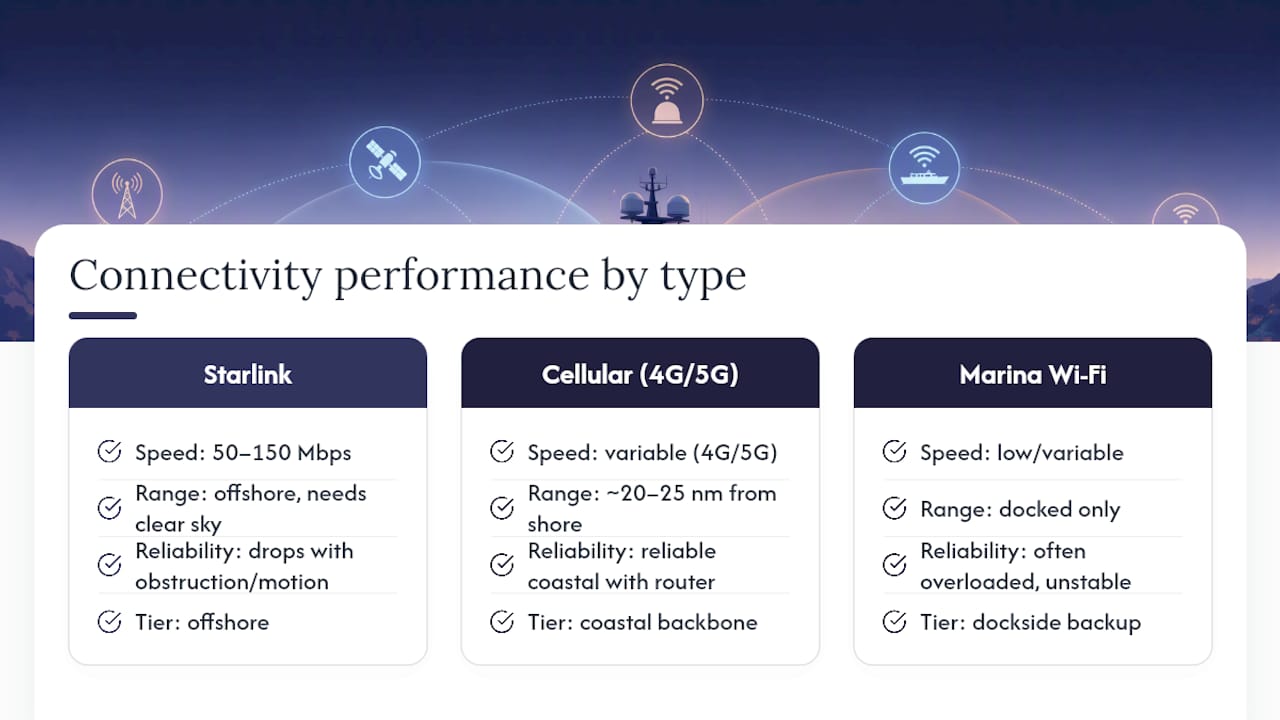
Starlink oferă aproximativ 50 – 150 Mbps la ancoră în condiții bune, este suficient pentru apeluri video HD și încărcări de date de mare volum. Este necesară o vedere în mare parte liberă către cer, iar performanța scade atunci când iahtul se leagănă la ancoră sau când antena se află în fața unui obstacol, cum ar fi un catarg, un bimini sau o stâncă din apropiere. De asemenea, regulile privind utilizarea sa în timpul navigării variază. Unele abonamente restricționează utilizarea în timpul deplasării, precum și acoperirea sau permisiunile de roaming modificare în funcție de țară, așa că ceea ce a funcționat pe ruta adriatică de anul trecut s-ar putea să nu se aplice și pe ruta ionică de anul acesta.
Rețea mobilă (4G/5G) este adevăratul motor al croazierelor de-a lungul țărmului. Vă puteți aștepta la un semnal fiabil la o distanță de aproximativ 20–25 de mile marine de țărm, atunci când iahtul este echipat cu un router de uz marin, asociat cu o antenă externă de mare câștig. Antena încorporată a unui telefon mobil pur și simplu nu poate atinge această acoperire odată ce vă aflați la câteva mile distanță de țărm. Routerele cu funcție de failover dual-SIM, care comută automat între doi operatori, acoperă lacunele lăsate de orice rețea individuală.
Wi-Fi în port își merită existența pentru o singură sarcină: sincronizarea unei copii de rezervă de mari dimensiuni sau descărcarea hărților nautice în timp ce nava este acostată. Rareori este suficient de stabilă pentru a te baza pe ea în cazul unor activități urgente, întrucât zeci de ambarcațiuni împart adesea același router supraîncărcat.
Privește-le pe aceste trei ca pe niște niveluri, nu ca pe niște concurenți: satelitul pentru comunicațiile offshore, rețeaua celulară ca infrastructură principală pentru uzul zilnic și Wi-Fi în port, ca bonus când se întâmplă să fii ocupat.
Cât costă, de fapt, conexiunea Wi-Fi pe un iaht închiriat?
Prețurile variază mai mult în funcție de categoria iahtului decât de destinație. În cazul închirierilor din gama economică și medie, pachetul de date de bază este adesea inclus în tariful săptămânal, în timp ce iahturile din gama premium și de lux tratează din ce în ce mai mult conectivitatea ca pe un argument de vânzare, mai degrabă decât ca pe un aspect secundar.
- Tarife fixe zilnice sau săptămânale acoperă un pachet de date prestabilit, obișnuit pe catamaranele cu echipaj și iahturile cu motor
- Pachete pe gigabyte tarif bazat pe utilizarea efectivă, potrivit pentru oaspeții care au nevoie în principal de e-mail și mesagerie
- Pachete all-inclusive în cazul abonamentelor premium, serviciile Starlink și datele mobile nelimitate pot fi incluse în prețul de bază, deși acest lucru este încă departe de a fi o practică generalizată
Starlink tinde să se încadreze într-o zonă gri. Unii operatori îl includ în dotarea standard a iahturilor de lux; alții îl tratează ca pe un serviciu suplimentar contra cost, pe care trebuie să îl soliciți cu săptămâni în avans. Dacă zilele tale se învârt în jurul streamingului, încărcării de fișiere mari sau conferințelor video, optează pentru pachetul de nivel superior. Dacă ai nevoie în principal de e-mail și, ocazional, de consultarea hărților, un pachet modest de date este suficient, iar economiile le poți folosi pentru o cabină mai bună sau o zi în plus pe apă.
Ce ar trebui să-l întrebi pe agentul tău imobiliar înainte de a face rezervarea?
Obțineți aceste răspunsuri în scris înainte de a semna, nu verbal pe cheu, în ziua sosirii.
- Sunt incluse datele de la Starlink, de la sateliții LEO sau datele maritime prioritare, iar acestea sunt incluse în prețul charterului sau se facturează separat?
- Ce router folosește iahtul, are o antenă externă de mare câștig și poate echipajul să ajute la rezolvarea problemelor legate de acesta?
- Care este limita de date și există restricții privind utilizarea conexiunii prin satelit în timpul navigației, comparativ cu perioada în care nava se află la ancoră?
- Care este configurația de alimentare? Întrebați în mod specific despre disponibilitatea alimentării de la mal, capacitatea invertorului, dimensiunea bateriilor și puterea generată de panourile solare, întrucât funcționarea unui dispozitiv cu consum ridicat, precum Starlink, în timp ce nava staționează la ancoră timp de ore întregi, poate suprasolicita bateriile de bord, care trebuie să alimenteze și sistemul de refrigerare și iluminatul.
Sfat profesional: Cereți agentului să vă precizeze modelul exact al routerului, nu doar să vă spună “avem Wi-Fi”. Un iaht echipat cu un router marin adecvat, dotat cu o antenă externă, va face față nevoilor unei familii numeroase; unul care se bazează pe hotspotul personal al căpitanului nu va face față.
Și în acest caz, înțelegerea terminologiei este de ajutor. Dacă un broker folosește termeni precum “failover WAN” sau “suport cardanic” și nu ești sigur ce înseamnă aceștia, un ghid succint privind terminologia din domeniul iahturilor face ca aceste apeluri să fie mult mai puțin intimidante.
Cum poți obține cea mai bună conexiune odată ce te-ai urcat la bord?
Câteva obiceiuri fac diferența între o săptămână frustrantă și una cu adevărat productivă, indiferent unde te va duce călătoria.
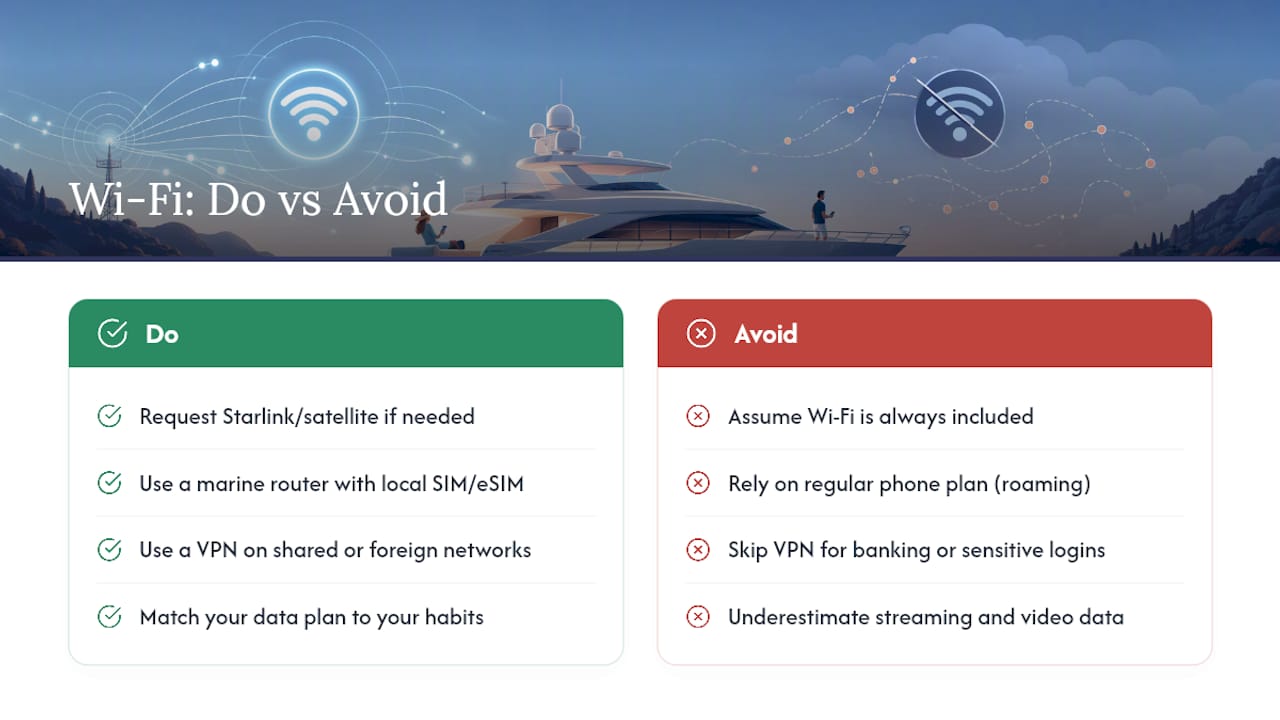
Nu te baza doar pe abonamentul operatorului de telefonie mobilă. A SIM preplătit local sau eSIM în combinație cu un MiFi sau un router dedicat, depășește orice hotspot de telefon, în principal deoarece hardware-ul dedicat suportă antene mai performante și nu consumă bateria telefonului în timpul utilizării. Ghiduri pentru parteneri pe Configurarea eSIM-ului pentru munca la distanță în străinătate merită să le răsfoiți înainte de a pleca cu avionul, mai ales dacă traseul dumneavoastră implică trecerea granițelor.
Executați o VPN ori de câte ori te conectezi la rețeaua Wi-Fi a portului sau la o rețea de telefonie mobilă din străinătate. Nu e vorba de paranoia. Rețelele partajate și operatorii de telefonie mobilă din străinătate pot expune sesiunile bancare la spionaj, iar un VPN te ajută, de asemenea, să eviți limitarea vitezei pe care unii operatori o aplică traficului de streaming.
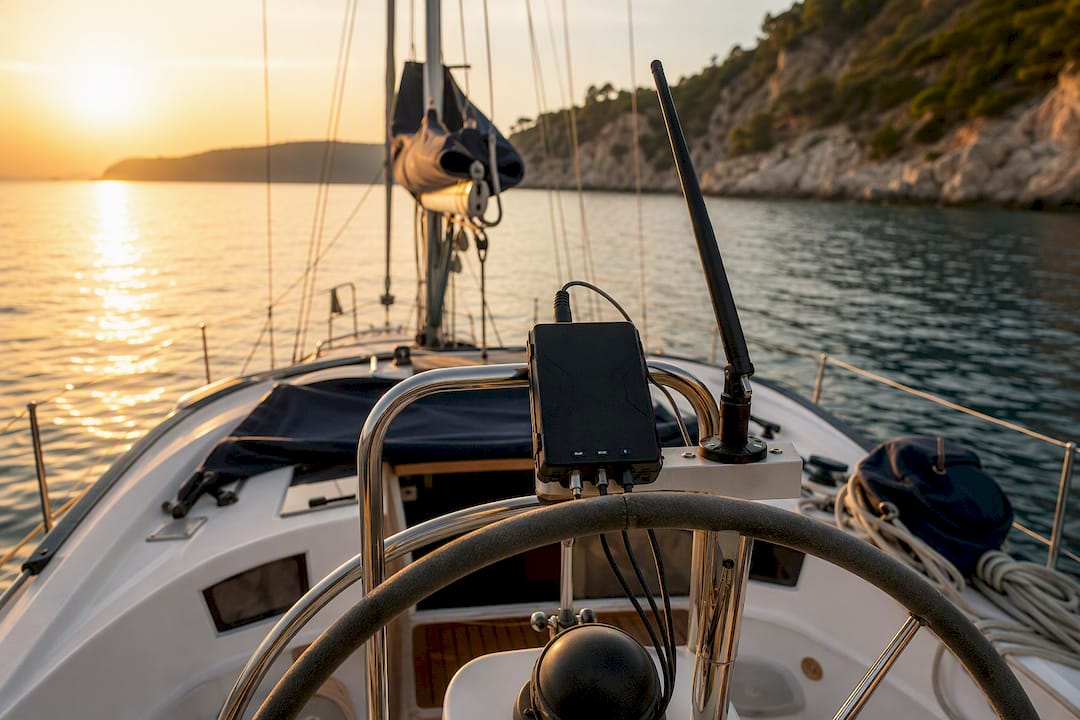
Dacă Starlink face parte din configurația ta, fii atent unde este montat. O antenă parabolică montată pe o linie de ancorare oscilantă pierde semnalul mult mai repede decât una montată pe un suport cardanic stabilizat, iar umbra aruncată de un catarg sau de un bimini la o oră nepotrivită poate întrerupe un apel chiar în mijlocul unei propoziții.
- Luați cu voi o cartelă SIM de rezervă de la un alt operator, ca măsură de siguranță împotriva eventualelor întreruperi ale acoperirii
- Păstrați funcția de hotspot a telefonului ca soluție de rezervă manuală, cu bateria complet încărcată
- Aduceți cel puțin o baterie externă pentru fiecare dispozitiv, deoarece prizele de încărcare de pe punte sunt adesea disponibile pe principiul „primul venit, primul servit”
Sfat profesional: O a doua cartelă SIM de la un operator diferit reprezintă o asigurare ieftină. Zonele fără acoperire rareori coincid între operatori, așa că, dacă unul pierde semnalul în apropierea unui promontoriu, celălalt păstrează adesea una sau două bare de semnal.
De ce experiența SailArmada în domeniul închirierii de ambarcațiuni stă la baza acestui sfat
Sailarmada organizează vacanțe private și de grup pe trasee din Marea Mediterană, iar întrebările legate de conectivitate apar aproape la fiecare discuție de planificare, în special din partea celor care lucrează de la distanță și a familiilor care gestionează cu greu conversațiile de grup de acasă.
Se observă două tipare care se repetă. Într-un caz de închiriere a unei ambarcațiuni în Marea Ionică, oaspeții s-au bazat exclusiv pe cartele SIM locale introduse într-un router marin și nu au pierdut niciun apel video pe parcursul celor zece zile petrecute vizitând diverse insule. În alt caz, o familie a solicitat serviciul Starlink în mod special pentru tatăl familiei, care lucra de la distanță, iar faptul că știau că acesta era inclus a schimbat modul în care a fost planificată întreaga săptămână, de la locurile de ancorare până la programul zilnic.
Oaspeții care se interesează din timp de conectivitate primesc răspunsuri mai bune și itinerarii mai bine gândite. Cei care presupun că totul va “funcționa pur și simplu” sunt cei care ajung să fie frustrați încă din a treia zi.
De aceea, în cadrul apelurilor de rezervare efectuate la Sailarmada se pune acum o întrebare directă cu privire la tipul de router și la disponibilitatea serviciului Starlink înainte de semnarea contractului.
Cum poți să te asiguri că toată lumea rămâne conectată la internet fără ca rețeaua Wi-Fi să funcționeze lent?
O familie de cinci persoane, cu cinci telefoane, două laptopuri și un televizor inteligent care redă conținut în fundal, va pune la grea încercare chiar și un router decent, dacă nimeni nu gestionează traficul.
Majoritatea routerelor marine îți permit să setezi priorități pentru dispozitive, așa că acordă prioritate apelurilor video și traficului de serviciu în fața actualizărilor aplicațiilor care rulează în fundal și a copiilor de siguranță ale fotografiilor în cloud. Aceste copii de siguranță consumă lățime de bandă fără să-ți dai seama. Un telefon configurat să încarce automat fotografiile și videoclipurile dintr-o săptămână îți va consuma cu ușurință întregul pachet de date peste noapte, în timp ce toată lumea doarme.
Distribuie utilizarea intensivă a rețelei pe cât posibil. Dacă două persoane trebuie să participe simultan la apeluri video, încearcă să eviți ca o a treia persoană să înceapă descărcarea unui film în același timp. Majoritatea routerelor de la bord afișează dispozitivele conectate și consumul curent într-o aplicație simplă, așa că o privire rapidă îți arată cine monopolizează banda înainte ca situația să degenereze într-o ceartă.
Stabiliți așteptările împreună cu grupul înainte de începerea călătoriei. Situația în care toată lumea urmărește Netflix simultan pe o barcă este cu totul diferită de cea în care toată lumea urmărește Netflix acasă, cu o conexiune prin fibră optică, iar o discuție de cinci minute în prima zi poate preveni multe frustrări în a treia zi.
Dispozitivele tale vor funcționa cu adevărat cu rețeaua iahtului?
Majoritatea telefoanelor, laptopurilor și tabletelor moderne se conectează fără nicio problemă la orice rețea Wi-Fi standard, dar câteva probleme de compatibilitate îi iau pe oaspeții charterului prin surprindere destul de des încât să merite menționate.
Laptopurile mai vechi, care nu dispun de chipseturi Wi-Fi moderne, pot întâmpina uneori dificultăți cu banda de 5 GHz, pe care mulți routere marine o utilizează în mod implicit pentru a asigura viteza. Dacă dispozitivul dvs. suportă doar banda de 2,4 GHz, rugați echipajul să verifice setările de bandă ale routerului. Televizoarele inteligente și dispozitivele de streaming aduse de acasă pot necesita, de asemenea, configurarea manuală a rețelei, în loc de detectarea automată, deoarece rețelele de pe ambarcațiuni nu transmit întotdeauna semnalul în același mod ca routerele de acasă.
Dacă este implicat Starlink, trebuie să știți că majoritatea dispozitivelor pasagerilor se conectează la acesta exact așa cum s-ar conecta la orice router, prin rețeaua Wi-Fi furnizată de Starlink, nu direct la antena parabolică. Antena parabolică comunică direct cu sateliții, iar telefonul dumneavoastră comunică cu un router obișnuit, alimentat de antena parabolică. Această distincție este importantă mai ales atunci când depanați o problemă: o conexiune întreruptă ar putea însemna că antena parabolică nu mai are vizibilitate către cer sau că routerul însuși trebuie repornit.
Cum se poate îmbunătăți intensitatea semnalului sub punte?
Interioarele iahturilor, în special ale celor cu motor de dimensiuni mai mari și ale catamaranelor cu mai multe punți, pot slăbi rapid semnalul Wi-Fi. Corpurile metalice ale navelor, lambriurile din lemn și ușile închise reduc toate raza de acțiune a semnalului.
În multe cazuri, amplasarea routerului contează mai mult decât calitatea acestuia. Un router ascuns într-un post de navigație sau într-un compartiment al camerei motoarelor va avea o performanță mult mai slabă decât unul montat central în salon. Dacă echipajul poate repoziționa routerul sau poate instala un repetor de semnal într-o cabină de la etajul inferior, diferența se simte adesea imediat.
Închideți mai rar ușile cabinei dacă aveți probleme cu semnalul și evitați să folosiți cuptorul cu microunde sau alte aparate care interferează cu benzile de 2,4 GHz în timpul unui apel. Pe iahturile cu mai multe punți, un repetor sau un extender de rețea de tip mesh amplasat pe puntea inferioară elimină majoritatea zonelor fără semnal pe care un singur router amplasat la timonerie nu le poate acoperi.
Ce viitor are internetul pe mare?
Conectivitatea maritimă evoluează rapid, iar direcția este clară, chiar dacă detaliile sunt încă în curs de definire. Rețelele de sateliți din orbita joasă a Pământului își extind acoperirea și reduc latența de la an la an, ceea ce înseamnă că diferența dintre “internetul de pe uscat” și “internetul pe apă” continuă să se micșoreze.
Este de așteptat ca tot mai multe iahturi să fie echipate cu routere integrate cu surse multiple, care combină automat rețelele de telefonie mobilă, Starlink și alți furnizori LEO, alegând sursa cu cea mai bună performanță în acel moment, în loc să-i oblige pe oaspeți să schimbe manual sursa. Oaspeții care închiriază iahturi întreabă deja despre Starlink, într-o etapă anterioară a procesului de rezervare decât acum câțiva ani, iar această cerere determină tot mai mulți operatori să o includă în dotarea standard, în loc să o ofere ca opțiune.
Eficiența energetică reprezintă următorul obstacol. Terminalele satelitare consumă încă o cantitate semnificativă de energie, iar pe măsură ce tehnologiile bateriilor și ale energiei solare se îmbunătățesc pe iahturile de charter, utilizarea internetului prin satelit pe tot parcursul zilei, fără a apela la alimentarea de la mal, devine din ce în ce mai realistă. Acest lucru ar putea, în sine, să facă ca conectivitatea în larg să devină mult mai răspândită în doar câteva sezoane.
Wi-Fi pe iahturile de închiriat: Ce contează și ce nu contează
Sfaturile obișnuite tratează Wi-Fi-ul ca pe un simplu element de confort de tipul „da sau nu”: fie iahtul dispune de el, fie nu. Această abordare ratează complet esența problemei. Ceea ce determină de fapt dacă conexiunea ta funcționează este combinația dintre echipamente, sursa de alimentare și așteptările realiste stabilite înainte chiar de a urca la bord.
Majoritatea ghidurilor acordă o importanță excesivă serviciului Starlink și subestimează rolul unui simplu router mobil dotat cu o antenă decentă. Pentru rutele de-a lungul coastei mediteraneene, o configurație 4G/5G bine pusă la punct depășește adesea performanțele satelitului în practică, pur și simplu pentru că nu depinde de vizibilitatea cerului sau de unghiurile de montare. Starlink își justifică costul pe traseele offshore mai lungi sau atunci când un pasager are cu adevărat nevoie de o conexiune garantată pentru muncă.
Acordați prioritate problemei alimentării cu energie înaintea oricărui alt aspect. Un iaht poate avea la bord toate echipamentele necesare, dar totuși să vă lase fără conexiune la internet dacă bateriile nu pot susține alimentarea după apusul soarelui. Interesați-vă de acest aspect înainte de a întreba despre viteza Wi-Fi. Este detaliul pe care aproape nimeni nu îl verifică, dar care ajunge să conteze cel mai mult în a patra noapte de ancorare.
Cum te ajută SailArmada să te asiguri de conectivitate înainte de a face rezervarea
Sailarmada este calea directă către o închiriere în care întrebările legate de conectivitate primesc răspuns înainte de a ajunge pe mare, nu după. În loc să aduni informații despre specificațiile routerelor și disponibilitatea serviciului Starlink din textul scris cu litere mici din broșuri, echipa noastră de rezervări îți confirmă echipamentul efectiv, limitele de date și configurația sursei de alimentare pentru iahturile pe care le-ai selectat, chiar în timpul convorbirii telefonice.
Asta înseamnă că nu va mai trebui să vă întrebați dacă mențiunea “Wi-Fi inclus” se referă la un router marin stabil sau la un hotspot suprasolicitat al căpitanului. Dacă călătoria dumneavoastră depinde de conexiunea la internet, fie că este vorba de muncă la distanță, de a ține familia la curent sau pur și simplu de a viziona un film într-o seară liniștită, când nava este ancorată, spuneți-ne din start și vă vom găsi un iaht care vă poate oferi cu adevărat acest lucru. Răsfoiți opțiuni private de navigație și solicitați detalii confirmate privind conectivitatea ca parte a ofertei dvs., înainte de a vă angaja față de anumite date.
Întrebări frecvente
Toate închirierile de iahturi includ Wi-Fi?
Nu. Conectivitatea de bază prin rețeaua de telefonie mobilă este obișnuită, însă serviciile Starlink sau sistemele satelitare dedicate sunt adesea opțiuni suplimentare pe care trebuie să le solicitați în mod expres, mai ales în afara categoriilor de iahturi de lux sau de top.
Este Starlink o opțiune mai bună decât rețeaua mobilă pentru închirierea unui iaht?
Nu neapărat. Starlink oferă viteze mari atunci când nava este ancorată și cerul este senin, dar rețeaua celulară de coastă, accesată prin intermediul unui router marin, este adesea mai stabilă pentru rutele care rămân aproape de țărm și are costuri de funcționare mai mici.
Pot folosi abonamentul meu obișnuit de telefonie în locul unui SIM local?
Se poate, dar costurile de roaming se acumulează rapid, iar antenele telefonice nu pot egala raza de acțiune a unui router marin dedicat. O cartelă SIM locală preplătită sau un eSIM într-un router adecvat oferă aproape întotdeauna performanțe mai bune la un preț mai mic.
VPN-ul îmi va încetini conexiunea pe un iaht?
Aceasta generează un mic surplus de încărcare, dar avantajul în materie de securitate pe rețelele Wi-Fi comune din porturi sau pe rețelele de telefonie mobilă din străinătate depășește, în general, pierderea minoră de viteză, în special în cazul operațiunilor bancare sau al autentificărilor sensibile.
De cât trafic de date am nevoie, de fapt, pentru o săptămână de charter?
Utilizarea de bază a e-mailului și a mesajelor consumă foarte puțin, adesea doar câțiva gigaocteți pe săptămână. Redarea video în flux, apelurile video și încărcările de fișiere mari pot multiplica acest volum de multe ori, așa că alege-ți pachetul de date în funcție de obiceiurile tale reale înainte de a face rezervarea.
Surse
- Iahtul conectat: Cele mai bune soluții de internet maritim pentru 2026 – Yachting Monthly
- Starlink pe ambarcațiuni în 2026: Ce ar trebui să verifice pasionații de navigație înainte de a pleca în larg – Sailoscope
- Internet prin satelit
Recomandate
- Explicații privind terminologia din domeniul iahturilor de lux pentru oaspeții care călătoresc pentru prima dată
- Cele mai bune idei de mâncare pentru iahturi, pentru excursii de o zi și petreceri
- Caracteristici ale iahturilor potrivite pentru familii: Ghidul complet pentru 2026
- Cum să profitați la maximum de activitățile de agrement pe iaht în timpul vacanței